Optimizing Queries with Functional Indexes: A Practical Guide
Did you know that MySQL 8.0 finally supports functional indexes? We usually think about applying them to JSON columns or for computed functions, but in real workloads, these straightforward use cases don’t always pan out. So, here are some other scenarios where functional indexes can actually shine. By the way, the examples here also apply to PostgreSQL, so feel free to take note if that’s your jam.
Making Comparison Operators Work with Indexes
You’ve probably seen how composite indexes can stop being fully utilized when you introduce a comparison operator somewhere in the middle. For instance, if you have a composite index on (a,b,c) and then run:
WHERE a = 1 AND b > 1 AND c = 1the query will only use the index on (a,b) effectively — it performs a range scan on b and basically ends there. This is the classic “range scan stops index usage” scenario.
But if you create a functional index like:
CREATE INDEX idx_comp ON TBL (a, (b > 1), c);You can keep using all parts of the index — a, then the boolean result of (b>1), then c. Think of (b>1) as a helper flag to indicate whether b is greater than 1, so you can still do all your filtering via an index.
However, due to a known MySQL bug, you have to rewrite your query slightly:
WHERE a = 1
  AND ((b > 1) = TRUE)  -- For now, comparing to TRUE is required to trigger the index
  AND c = 1
See the bug report for more details:
Granted, in a simpler scenario like WHERE a=1 AND b>1 AND c=1, you might just build an index (a,c,b). But functional indexes really shine when you need to handle multiple comparisons, like WHERE a > 1 AND b > 1 AND c >1. Something like:
CREATE INDEX idx_comp ON TBL ((a > 1), (b > 1), (c > 1));plus a slight tweak to the query can solve otherwise painful multi-range queries.
Downsides
- You’re hardcoding constants into the index. That means if the threshold changes, the index definition also needs to change.
- Logic is now in your index. Whenever that logic changes, you have to remember to update the index, too.
- For now, because of the MySQL bug mentioned, you usually need to modify your query syntax a bit.
Using an Index for NOT Conditions
Here’s the deal: negation (NOT) conditions often cause your composite index to behave like it does with simple comparisons, meaning it may drop out after the first column and revert to a range scan. For example, if you have an index on (a,b,c) and you do:
WHERE a = 1 AND b <> 1 AND c = 1The DBMS will likely only make full use of (a) and partially use (b) before giving up. It’s basically the same phenomenon we saw with comparisons like b>1.
To fix that, you can convert the b<>1 logic into a function that returns a boolean-like result. One straightforward technique is to use the absolute value function as a “flag generator.” For instance:
CREATE INDEX idx_comp ON TBL (a, (ABS(b - 1) > 0), c);By doing ABS(b-1), you’re effectively calculating the distance from 1; if that distance is greater than 0, it means b is not equal to 1. Then, in the query, you’d do:
WHERE a = 1
  AND ((ABS(b - 1) > 0) = TRUE)
  AND c = 1
That little hack treats (ABS(b-1)>0) as a stored “flag” in the index, so the optimizer can keep walking through (a,(ABS(b-1)>0),c) in a single pass.
Pro tip: If you don’t want to compare against =TRUE, you could index (ABS(b-1)) itself and then just do WHERE ABS(b-1)>0. That’ll work too — some people find it a bit cleaner.
This trick isn’t limited to just a single negation either. If you need multiple negative conditions, or a mix of > and <>, you can set up your functional index with several boolean-flavored expressions.
Downsides
- Same as the comparison operator downsides, plus the rewrite in the query is a bit more confusing.
- You do have to rewrite the query, whereas with a normal index you wouldn’t.
OR Conditions and Indexing
OR conditions are notoriously tough to optimize using a single index. If you do something like:
WHERE price > 100 OR stock < 50The database usually picks either price or stock to use for an index range scan, not both. If the logic was trivial, you could rewrite this as two separate queries with a UNION, but that’s not always feasible.
One workaround is to transform OR logic into a function, then build a functional index on that. For example:
CREATE INDEX idx_greatest_price_stock ON products (
    (GREATEST(price - 100, 50 - stock))
);
Then rewrite your condition to:
WHERE GREATEST(price - 100, 50 - stock) > 0;So if either condition “triggers” (price > 100 or stock < 50), GREATEST(...) will be above 0, and the index can handle it.
Column IS NOT NULL
A check like column IS NOT NULL might turn into a range scan as well. But if you create:
CREATE INDEX idx_f ON TBL ((column IS NOT NULL));and then query:
WHERE (column IS NOT NULL) = TRUEIt can prevent that from degrading into a range scan. Think of it as a “pre-check” for nulls.
Flag IS NOT TRUE
If you have a three-valued column, say TRUE, FALSE, or NULL, it’s usually best to redesign it to avoid tri-state booleans. But if you’re stuck, you can do:
CREATE INDEX idx_f ON TBL ((flag IS NOT TRUE));And then:
WHERE (flag IS NOT TRUE) = TRUEBoom, you now have an index-based approach.
Text Matching
Comparing long text fields can be expensive, and indexing them can be overkill too. One old-school trick is to store a hash of the URL:
WHERE url_crc = CRC32('https://www.example.com/')
AND url = 'https://www.example.com/'
Previously, you had to keep a separate column url_crc. But now, with functional indexes, you can do:
CREATE INDEX idx_crc ON TBL (CRC32(url));So you don’t need an extra column if you just want to speed up those lookups (though your query does still have to use CRC32(url) for the condition). This approach also helps if you’re dealing with huge text-based keys or if, for some reason, you used a VARCHAR-based UUID as a primary key (not recommended!). You can convert it to an integer or shorter hash on the fly and let the index handle the rest.
Transforming IN / BETWEEN
IN and BETWEEN queries often lead to range scans as well. You can theoretically do something like:
CREATE INDEX idx_in ON TBL ((ids IN (0001, 0002)));
CREATE INDEX idx_bet ON TBL ((ids BETWEEN 0001 AND 0002));
This is only really viable if you have fixed values or a small range you care about. It’s a pretty niche scenario but can help in edge cases.
Converting Any Range Scan Into a Functional Index
If you can live with the constant values inside your index definition, you can convert almost any range-based query into something that uses a functional index. For example, even LIKE 'STR%' can be turned into:
CREATE INDEX idx_l1 ON TBL ((str LIKE 'STR%'));…but obviously, that’s only useful if ‘STR’ is fixed. For partial matches like mid-string or end-of-string, you could do:
CREATE INDEX idx_l2 ON TBL (SUBSTRING(str, 5));To handle some substring lookups (for example, searching by a domain in email addresses).
ORDER BY
The same concept applies to ORDER BY. If your WHERE condition becomes a range scan, you might lose index-based sorting. But if you can turn part of the WHERE logic into a function, you can keep all your sorting inside the index. For example:
WHERE a = 1 AND b > 1
ORDER BY c
usually means you lose ordering by c. But with:
CREATE INDEX idx_comp ON TBL (a, (b>1), c);you can index from a all the way through c. If you need (c,b) ordering:
CREATE INDEX idx_comp ON TBL (a, (b>1), c, b);And if you’re sorting on something like (a+b), you can also create a functional index on (a+b).
Other Use Cases
- Date-based filtering, like indexing
YEAR()orDATE(). - Price calculations in your queries.
- Case conversions (
UPPER(),LOWER()). - Rounding functions like
FLOOR().
Just note that nondeterministic functions (e.g., RAND()) can’t be used in functional indexes.
Comparison of Similar Features
Here’s a quick table comparing approaches. Moving from left to right, the column is “closer” to being a real, physical column.
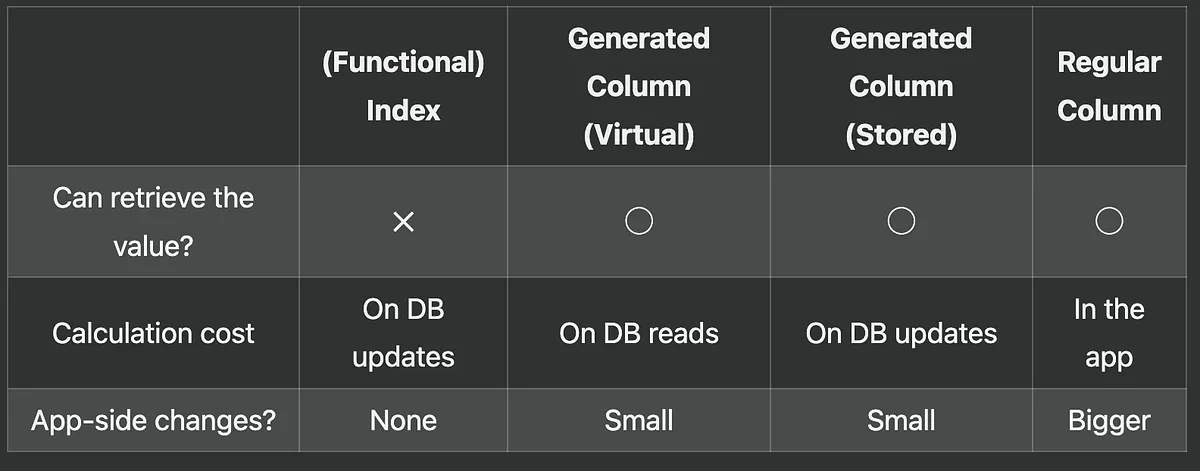
Each option shifts where and when you pay the cost. If you only need the computed value for filtering, a functional index is handy. Keep in mind any index will add overhead for updates.
In other words, functional indexes store the “precomputed” result inside the index itself, letting you filter on it without adding a new column. But there’s always the tradeoff: if this is part of your fundamental logic, maybe consider re-architecting to keep your data model clean.
Wrap-Up
By encoding logic into functions, you can greatly expand how you leverage indexes. It’s a powerful trick for queries that would otherwise suffer from partial index usage, range scans, or expensive lookups on big text columns. At the same time, be aware of the maintainability tradeoffs — hardcoding constants and rewriting queries can accumulate technical debt if not revisited later.