AWS Cost Optimization Techniques for Databricks on AWS Workloads
This guide focuses on practical AWS cost optimization strategies for scenarios where you deploy Databricks on your own AWS infrastructure, instead of leveraging a fully managed (serverless) Databricks solution. By applying these techniques, you can reduce AWS costs while maintaining efficient performance for Databricks workloads.
Reduce AWS Config Costs
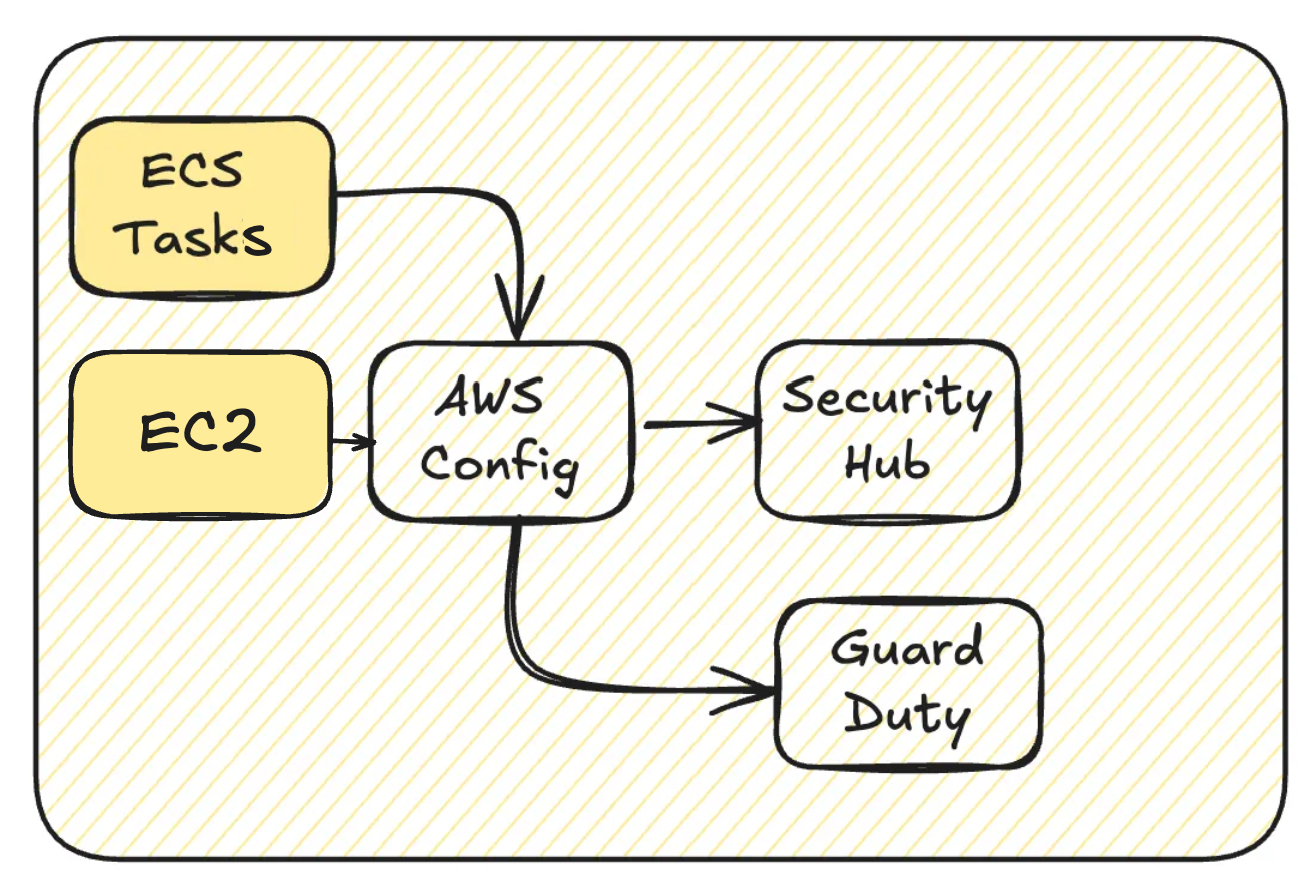
A typical challenge with off-the-shelf solutions is the frequent spin-up and shutdown of EC2 instances. This activity generates a significant volume of inventory and change-tracking data in AWS Config, leading to higher costs.
Over time, AWS has introduced additional managed rules for EC2 in AWS Config, which has steadily increased the cost per instance. (EC2 instances are often seen as flexible but somewhat “legacy” in AWS and are frequent targets for attacks, necessitating more rules.)
Additionally, Config recording often triggers other AWS security services, creating a chain reaction of escalating costs.
To manage these expenses, consider either excluding EC2 (or other resources) from AWS Config recording or switching from continuous recording to daily recording.
However, keep in mind that this setting applies to all EC2 instances in the account. Applications or bastion hosts running on EC2 could unintentionally fall outside AWS Config’s monitoring, potentially increasing security risks.
Consider S3 Versioning
Delta tables include a time-travel feature, which may overlap with S3 versioning. Depending on your specific needs, you might find that S3 versioning is entirely unnecessary.
If you decide to disable S3 versioning, keep in mind that older object versions will not be automatically removed. Be proactive in cleaning them up completely to avoid unnecessary storage costs.

On the Delta table side, you can manage retention by removing data beyond its retention period using the VACUUM command.
Databricks recommends disabling bucket versioning so that the
VACUUMcommand can effectively remove unused data files.
or
Databricks recommends retaining three versions and implementing a lifecycle management policy that retains versions for 7 days or less for all S3 buckets with versioning enabled.
Use the S3 Storage Lens feature to analyze the size breakdown of your S3 buckets and gain insights into your storage usage. This tool also allows you to visualize the amount of data being used by S3 versioning, helping you identify potential areas for optimization.
Reduce EBS Costs
Start by migrating your EBS volumes from gp2 to gp3. This simple change can result in approximately 20% cost savings. For detailed configuration steps, refer to the following resources:
Ideally, gp3 should be set as the default volume type.
Another critical consideration is to verify whether any jobs are attaching a large number of EBS shuffle volumes. Most workloads don’t require additional shuffle volumes, as each worker already comes with 30GB + 150GB of EBS storage by default.
Key settings to review include:
aws_attributes.ebs_volume_type: Specifies whether shuffle volumes should be added, and if so, their type.
aws_attributes.ebs_volume_size: Defines the size of the EBS volume (in GiB).
aws_attributes.ebs_volume_count: Determines the number of EBS volumes.
For instance, setting ebs_volume_count to 2 effectively doubles your disk usage. To improve efficiency, you can also enable local storage autoscaling by activating enable_elastic_disk.
Reduce NAT Gateway Traffic
When configuring AWS environments — not just for Databricks — always set up an S3 Gateway Endpoint to ensure that S3 data transfers are cost-free. This is a best practice for minimizing unnecessary NAT Gateway traffic.
For high-volume data transfers or specific destinations, consider setting up PrivateLink to further optimize costs.
Avoid Incremental Listing in Auto Loader
While the exact version is unclear, Incremental Listing in Auto Loader has been deprecated. By default, every 8th operation triggers a full directory scan using the S3 List API. This significantly increases API call charges as well as overall processing costs, including additional time and resource consumption.
Purchase Savings Plans
Consider purchasing Savings Plans to reduce EC2 costs. While EC2 Reserved Instances (RIs) typically offer greater discounts, Savings Plans are a better option if your workloads are not entirely predictable.
Leverage Spot Instances
Optimize your cluster costs by configuring the percentage of your cluster to use Spot Instances.
Keep in mind, however, that the DBU cost remains unchanged when using Spot Instances. To achieve the best overall cost savings, including DBU and instance costs, start by reviewing the discount rates for the instance types you plan to use.
Consider Upgrading Instance Types
Upgrading your EC2 instance family can deliver better performance and potentially reduce costs. However, EC2 costs don’t always scale proportionately with DBU rates. In some cases, EC2 costs may remain unchanged while DBU rates increase. Since DBU costs heavily influence per-instance pricing, it’s crucial to monitor these changes closely.
You may also consider exploring Graviton-based instances. However, be aware that several features are unavailable, as documented. Additionally, DBU rates aren’t always lower, and performance gains are not guaranteed, making thorough testing essential before deployment.
Additional Measures
Right-sizing your clusters is, of course, essential. You can optimize Databricks costs by tailoring configurations on a per-cluster basis. Be sure to review recommended practices step by step for maximum efficiency.
For example, default cluster settings often incur additional costs due to idle DBU usage for up to two hours. Adjust these settings as needed to avoid unnecessary expenses.
Upgrading your runtime version and adopting the latest features of Databricks and Delta Tables are highly recommended. These updates can improve performance and reduce costs.
Additionally, don’t overlook improvements on the Spark side, as well as relevant updates from AWS, which can directly impact your setup’s efficiency and capabilities.
For further optimization tips, check:
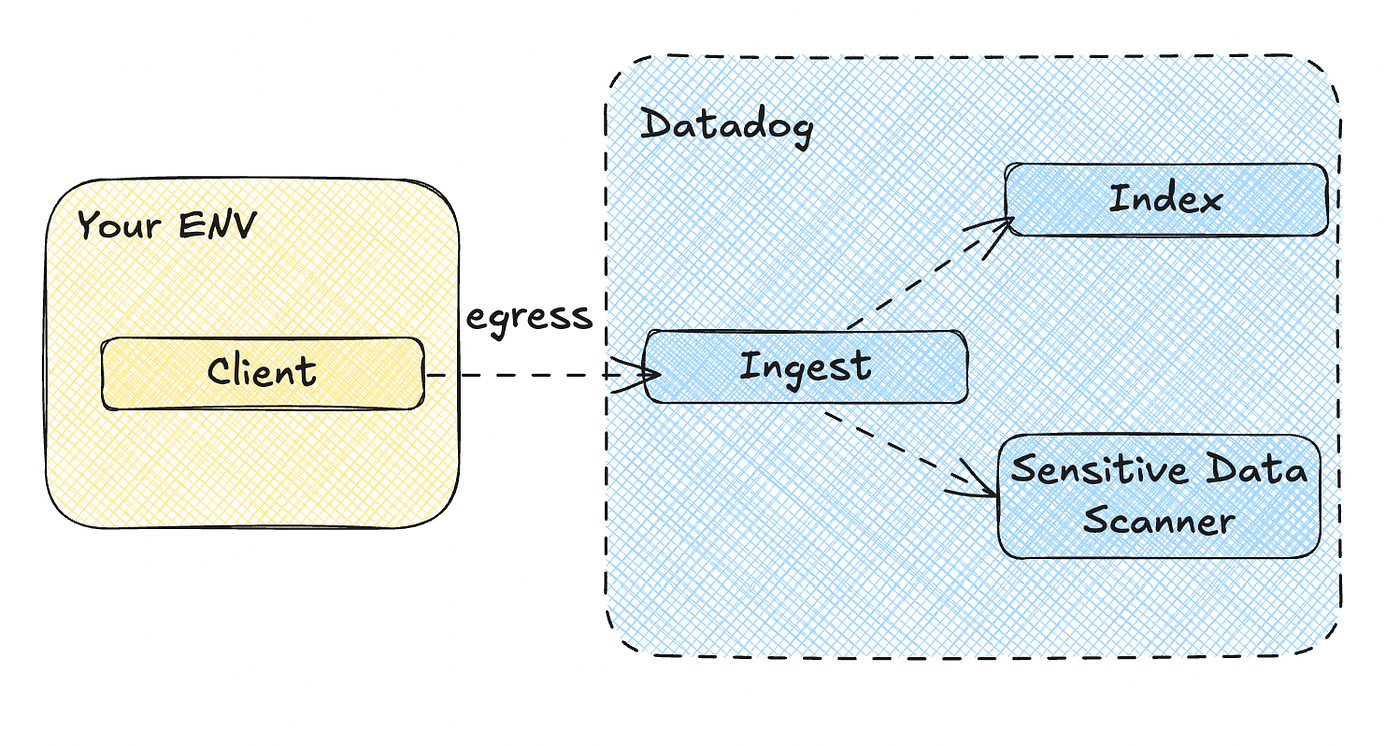
Although not directly tied to AWS, third-party monitoring tools like Datadog may charge you for the EC2 resources used by Databricks.
I won’t cover overall architecture or general performance optimization in this article.
Challenging Issues
CloudTrail
Costs scale proportionally with the volume of service access.
GuardDuty
Enabling S3 Protection can lead to significant costs when analyzing Unity Catalog access on S3. You can review the cost breakdown in the GuardDuty usage section. Note that the underlying data source for this analysis is CloudTrail.
Finally
Cost optimization can feel overwhelming, but starting small can lead to big results. Begin by focusing on AWS Config settings — adjust recording intervals or exclude unnecessary resources to immediately reduce costs while maintaining essential monitoring. Small changes like these can pave the way for larger, more comprehensive optimizations down the line. Let’s take the first step today!
This article is the English version of the original article written in Japanese, available here.